
Pros
✔️Large screen, HDMI out, and range of context-sensitive control.
✔️Can optimize games for 4:3 or 16:9 optimization.
✔️Can load ROMs for many classic systems via microSD card
Cons
✖️Small selection of Atari 5200 and 7800 games.
✖️No button-mapping for user-added ROMs
Score: 9️⃣ (out of 10)
Once, the Flashback consoles provided just about the only way to relive the early days of Atari videogaming. Lately, however, in addition to a range of mini remakes like the Atari 7800+ (now available in a Pac Man edition) the market has been saturated with a range of products that provide retro experiences on the go. Most of these, though, have had smaller displays and have been sold with unlicensed game files. Previous sanctioned Atari handhelds have included AtGames’ nearly decade-old Flashback Portable (with a 2.8″ display and bundled with up to 80 games) and My Arcade’s Pocket Player Pro (with a 2.75″ display and bundled with 100 games).
Design
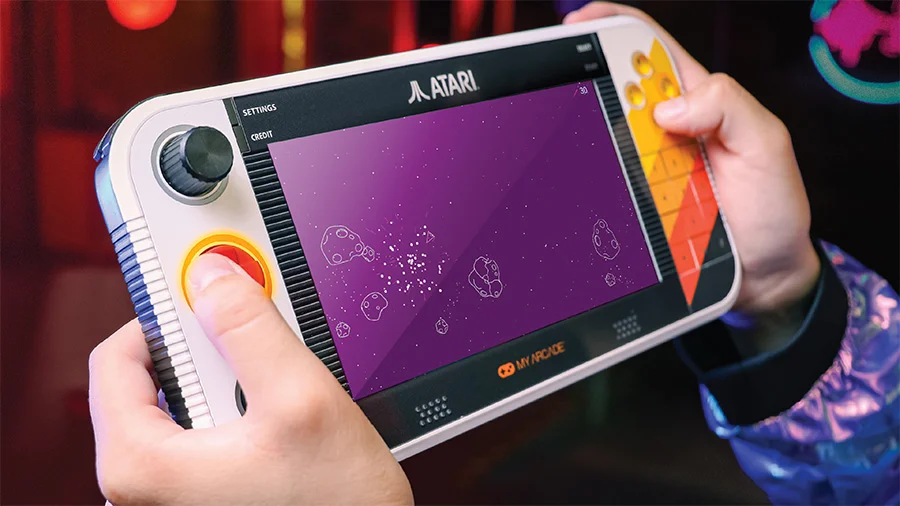
The Atari Gamestation Go is a follow-up to My Arcade’s Gamestation Pro retro console released in 2023 and the second in a trio of devices that will include the arcade cabinet-styled Gamestation Mega. It sports a 7″ display flanked with controls much like the Nintendo Switch or the Valve Steam Deck. Unlike those devices, it omits analog joysticks in favor of a of controls more popular in the day, including a knob for paddle games, a trackball, and a number pad, which was present on the controller of the Atari 5200. The numpad also appeared on the controllers of devices the Gamestation Go unofficially supports under emulation, including the Intellivision and Colecovision, but there isn’t yet a way to activate it for those games.
Its more than 200+ bundled titles include a wide range of 2600 and arcade games and a smaller selection of 5200 and 7800 games, the Go includes a grab bag of titles from other developers, including Jaleco and Piko, and both the 2600 and arcade versions of Pac-Man (but not Ms. Pac-Man). It’s all a bit random, but there’s certainly something for just about anyone. The Gamestation’s coolest trick is its lighting up the relevant controls and buttons for supported games. For example, the trackball is lit up for Missile Command while the knob is illuminated for Breakout. My Arcade also supports head-to-head play for two-player games by linking two Gamestation Go units.
Performance
While retro purists will bemoan the use of a wider-screen angle, the Gamestation Go allows manual selection of a 4:3 aspect ratio for classic titles and some games make the leap without too much distortion. The “reloaded” versions of Atari classics such as Missile Command, Asteroids, and Breakout, the wider screen aspect ratio is natively supported. It provides instructions and control schemes for supported titles; My Arcade has filled out even more details and options in its recent 1.1 firmware update, which also provides a host of fixes for games, particularly ones that originally used vector graphics such as Tempest. indeed, in addition to issuing a firmware update out of the date, those who have purchased the device can look forward to support through other accessories such as a controller that replicates the controls on the Go for when the device is placed on a surface using its integrated kickstand or connected to a TV via HDMI.
Conclusion
The Gamestation Go is a ton of fun. It’s among the pricier portable options for retro gaming, with many handheld options selling for less than $100. The Gamestation Go offers more polish for the games it officially supports, but lacks the breadth of those platforms, which also provide a better experience for the Gamestation’s unsupported systems. We’d like to see a middle ground reached. While we wouldn’t expect the level of detail and controls present for the Gamestation’s licensed titles, surely My Arcade can provide something other than a listing. First up would be button-mapping.